Thursday, May 18, 2017
This is my way how to change my htc hd2 to ice cream sandwich Android 4 0
This is my way how to change my htc hd2 to ice cream sandwich Android 4 0
Before doing any thing please backup your personal data contact number etc in your pc or memory card in an easy means,Take advantage of USB cable connect with PC download the free pocket ware like software to backup the contacts,Charge the HTC HD2 Battery upto 80% percent take a breath and then ready for upgrading and please Read carefully all article before upgrading because in an wrong way you can break your mobile phone so be careful we provide you the best Method to upgrade in and easy steps.

Some applications you need to install and Download This Files First And Save In Your Computer In Dave Place (you can download on the download link below) also Download This files And Unzip The Three Firts Files In His own folders don,t unzip the Rom folder:
HSPL4, MAGLDR, Clockwork Recovery Mod v1.3, Android 4.0 Rom For The Htc Hd2
Psstt...Now it,s time to boot your mobile in USB mode it,s very simple just remove the battery then count 3 and then set the battery again,Now hold the volume down button while Restarting your mobile phone.You see a new interface on your htc it,s call Usb mode now you See 3 triangle colours box red green blue,In the end you see a White triangle box with serial text showing it,s say that connect your device with computer via data cable.
And time to connect your device and wait for some time to load the drivers Then you see a Serial text Change in to usb Text it,s mean you are connected sucessfully.
Now it,s time to boot your mobile in USB mode it,s very simple just remove the battery then count 3 and then set the battery again,Now hold the volume down button while Restarting your mobile phone.You see a new interface on your htc it,s call Usb mode now you See 3 triangle colours box red green blue,In the end you see a White triangle box with serial text showing it,s say that connect your device with computer via data cable.
In Order to fully compatible your device with android you need to update the SPL4 Version to new version we give you above in link.

OK...and lets continue and You Need to check the version of SPL4 via triangle The red triangle box show the SPL version you need to change this to SPL_2.08,If it,s not change don,t worry we can change the version with above SPL4 version,Download the above version and extract in pc then open the Spl4 Version and click on the Spl4.Exe,Follow the instruction on the screen and choos the 2.08.0000 and then click.Now you see a Word on mobile screen we hack it or crack it.You Are done.
Do not forget for this point, In order to install the android version on your old windows mobile phone you neeed to install the MAGLDR on your mobile phone.

And please take a note Note if you install the MAGDLR on your htc you cannot go back to windows version,You need to download the latest version from the Htc ebsite for your mobile phone,Now Connect Your Mobile Phone With Your Computer and wait for drivers install,You see a full instruction and do that like he said,Some users feel problem about drivers and MAGLDR Cannot work normally don,t worry on your windows update and wait to download the drivers for your computer then untick the option from htc menu setting then go to usb mode and untick the option send data faster and tick on the Sync data option and wait for drivers installation,Now when you done your mobile is restarted and you are here to MAGLDR Menu system.

And this is the last step, Now go to 4th option USB flasher and click it then connect your device again with pc now this time open the Clockwork Mod Recovery folder and then open the Clockworkd.Exe and wait for starting,They give you full instruction to install the Recovery on your device wehen you install it you can easily go to recovery mode by clicking on AD Recovery Option,You can see the above i give you the rom download link download it and then don,t extract it and copy the file in your SD Card and Put in your mobile phone,Go To Ad Recovery and click on sd Card Zip Installation Option then install the ICS Rom,After some time you see a ICS on your mobile phone voila you done it with an easy way.
Come and download this all items HSPL4, MAGLDR, Clockwork Recovery Mod v1.3, Android 4.0 Rom For The Htc Hd2 in download link
Go to link download

Friday, April 28, 2017
How To Change Wifi Mac Address For Whatsapp Hacking
How To Change Wifi Mac Address For Whatsapp Hacking
- Settings > General > About > Wi-Fi Address
- To find the Mac Address on an Android: go to Settings > About phone > Status > Wi-Fi MAC address
- If the phones are connected to the same line Wi-Fi, you can find the Mac Address directly from a PC or Mac:
Go to link download
Monday, April 24, 2017
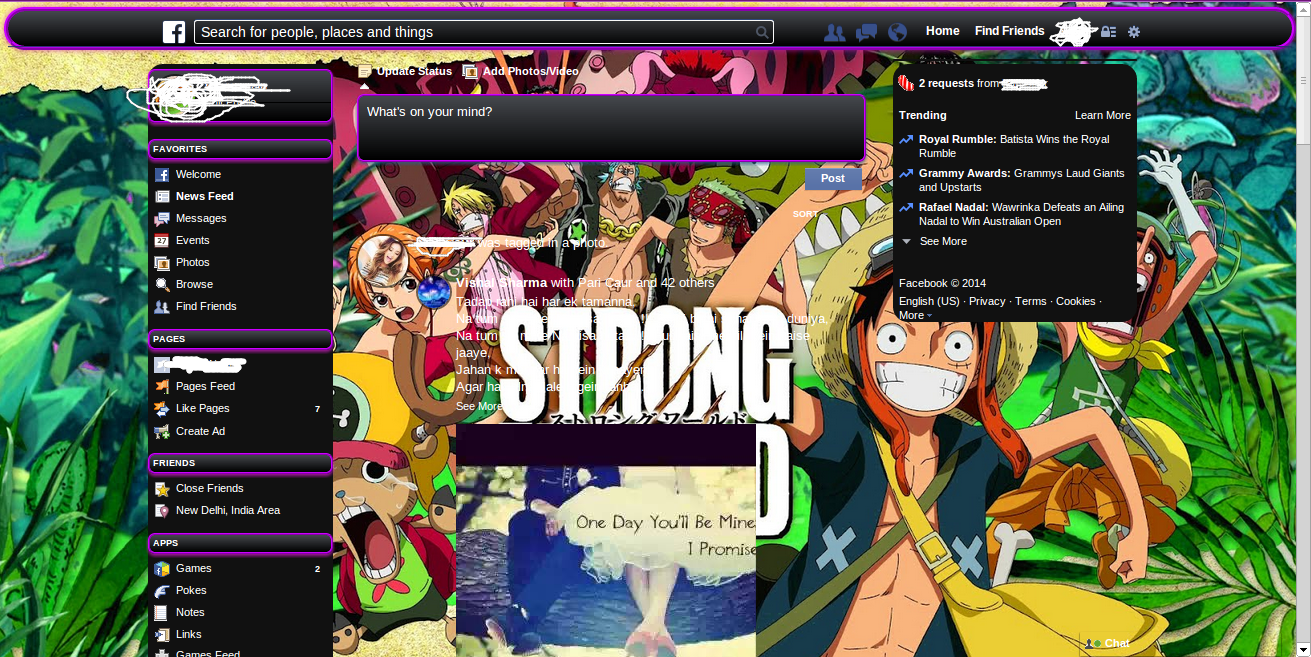
Change background and theme of facebook
Change background and theme of facebook
Follow these simple steps:
Go to link download
Monday, April 10, 2017
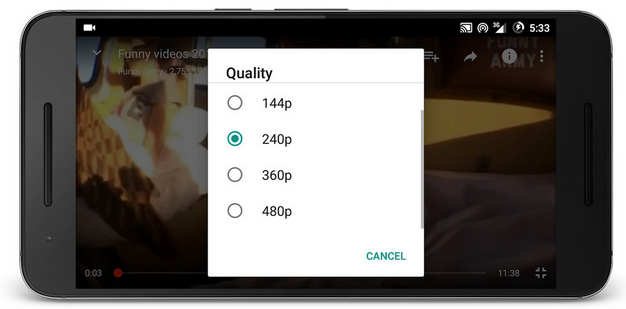
How to Change YouTube video Quality on Android
How to Change YouTube video Quality on Android
Changing YouTube video quality is one of the basic tips you should know while making use of the YouTube android application. Most of you might be familiar with the change option, but some others still don’t know how to change video quality of a YouTube video from android.
Go to link download
Wednesday, March 22, 2017
How to Root Tecno W4 and Change IMEI Number
How to Root Tecno W4 and Change IMEI Number


Go to link download
Friday, March 10, 2017
How to Rename Android Apps and Change their Icons
How to Rename Android Apps and Change their Icons
Renaming a file and changing its icon is a child’s play on Windows and other such operating systems meant for a personal computer. However, have you ever thought about renaming and changing the icon of the applications installed on your Android? Might be fun, right?
Well, I thought about it one day and then started researching on how it can be done. As of now, there doesn’t appear to be an app on the Play Store which can rename an installed app, not even for a rooted device. But then I came across a tool for Windows called APK Editor onXDA Forum.
Using APK Editor once can easily rename an Android application and change its default icon even for a non-rooted android phone. So let’s see how it’s done.
Rename and Change Android Apps Icon
Step 1: First of all, we will need the APK package of the app you want to rename and change the icon for. If you don’t have the APK with you, but the app is installed on your phone, you can easily compile its APK using the Astro file manager.
Step 2: Download and extract APK Edit v0.4 to a folder in your computer. As APK Edit v0.4 needs java to work, please install it if you don’t already have it.
Step 3: Now that you have both – the APK file and the APK editor – let’s start with the editing. Launch APK Edit.exe that you extracted in the previous step and load the APK file you want to edit.

Step 4: The tool will now read the file and display the app icon and name under the General tab. You can edit the name text field directly and click on the icon image to search for a new icon. Please make sure that the icon file is in PNG format and in perfect square


Step 5: After you are done with the editing, click on the Apply button to save the changes.
Although the app gives you an option to directly push the apps to the device using a data cable, I would suggest you to transfer the modified APK file to your internal hard disk using Wi-Fi or data cable and then install it on the device.


Even while installing the file you will see the changes in the file name and the app icon. After the app’s installed, you will see the app with the user defined icon and name.

Go to link download